OnlineLoess API
See also: fastLoess
When to Use
Section titled “When to Use”- Data arrives incrementally (sensors, streams)
- Need real-time smoothed values
- Fixed memory budget
OnlineLoess
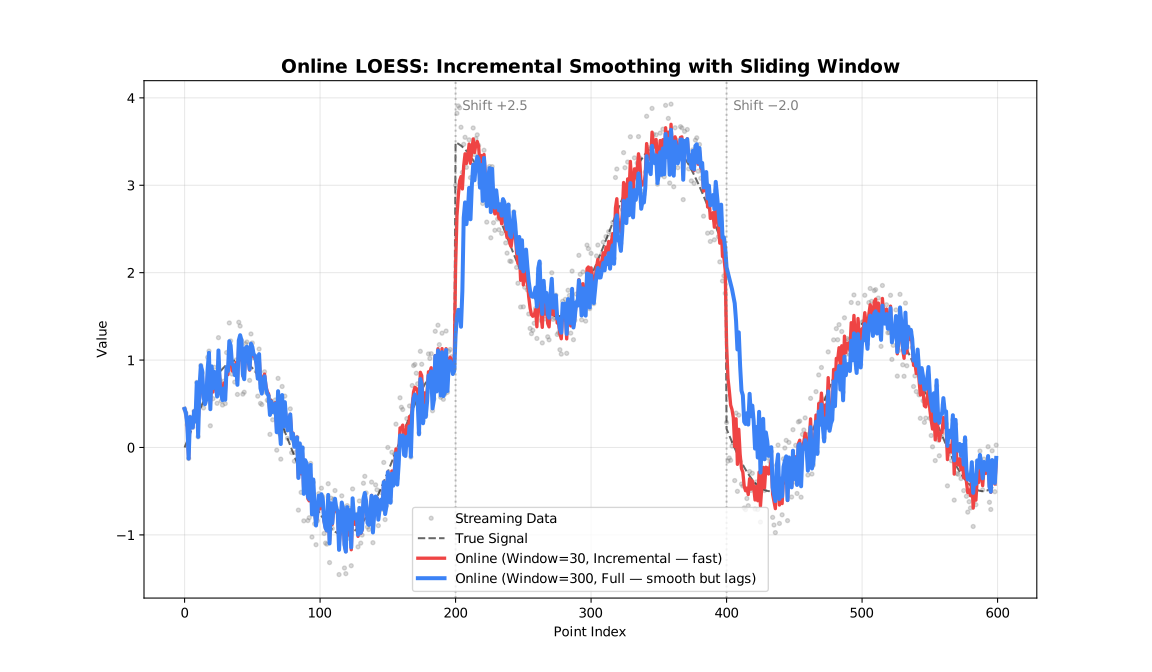
Section titled “OnlineLoess”The OnlineLoess class updates the model incrementally with new data points.
Constructor:
const { OnlineLoess } = require('fastloess-wasm');
const online = new OnlineLoess({ fraction: 0.5 }, { window_capacity: 50, min_points: 3 });console.log("typeof add_point:", typeof online.add_point);
typeof add_point: functionoptions: An object containingOnlineSmoothOptionsfields (a subset of the BatchLoessOptionsfields — see below).onlineOptions: An object containingOnlineOptionsfields.
add_point(x, y)
Section titled “add_point(x, y)”Adds a single point to the sliding window and returns an OnlineOutput once enough points are available, or null while the window is still filling.
const { OnlineLoess } = require('fastloess-wasm');
const n = 100;const x = Float64Array.from({ length: n }, (_, i) => i * 2 * Math.PI / (n - 1));const y = Float64Array.from(x, xi => Math.sin(xi) + 0.1);
const online = new OnlineLoess({ fraction: 0.5 }, { window_capacity: 50, min_points: 3 });
// Returns null until min_points (3) are reachedonline.add_point(x[0], y[0]);  // nullonline.add_point(x[1], y[1]);  // null
// Returns OnlineOutput once enough points are availableconst result = online.add_point(x[2], y[2]);console.log("Smoothed y:", result.y);
Smoothed y: 0.22659245357374927For multivariate models, set dimensions and pass a Float64Array with one coordinate per dimension to add_point_vector():
const { OnlineLoess } = require('fastloess-wasm');
const online2d = new OnlineLoess( { dimensions: 2, surface_mode: 'direct', outputs: ['gradient'] }, { window_capacity: 10, min_points: 3 });const output = online2d.add_point_vector(new Float64Array([0.5, 1.25]), 2.0);
Use add_point_weighted(x, y, weight) or add_point_vector_weighted(x, y, weight) for finite non-negative case weights. window_diagnostics() computes fit metrics on demand; predict_window(newX, options) predicts from a fresh fit of the bounded current window.
Options Structures
Section titled “Options Structures”OnlineSmoothOptions
Section titled “OnlineSmoothOptions”| Field | Type | Default | Description |
|---|---|---|---|
fraction | number | 0.67 | Smoothing fraction (bandwidth) |
iterations | number | 0 | Number of robustifying iterations; positive values require update_mode = "full" |
weight_function | string | "tricube" | Weight function name |
robustness_method | string | "bisquare" | Robustness method name |
degree | string | "linear" | Polynomial degree of local fit |
dimensions | number | 1 | Number of predictor dimensions |
distance_metric | string | "normalized" | Distance metric; use "minkowski:p" for custom p |
weighted_metric_weights | number[] | null | Per-dimension weights (used when distance_metric = "weighted") |
surface_mode | string | "interpolation" | Surface computation mode |
cell | number | null | Cell size for interpolation grid (smaller → more vertices, higher accuracy) |
interpolation_vertices | number | null | Number of interpolation vertices |
zero_weight_fallback | string | "use_local_mean" | Zero-weight handling strategy |
boundary_policy | string | "extend" | Boundary handling policy |
boundary_degree_fallback | boolean | null | Fall back to lower polynomial degree at boundaries when higher degrees fail |
scaling_method | string | "mad" | Residual scaling method |
auto_converge | number | null | Auto-convergence tolerance |
missing | string | "error" | Policy for non-finite (NaN/Inf) values in each point |
outputs | string[] | [] | Optional fields: "weights", "gradient" (or "derivative"), "se" |
intervals | { confidence?: number; prediction?: number } | disabled | Grouped confidence and prediction coverage levels. |
Cross-validation, "sorted" output, "diagnostics" output, "residuals" output, and parallel are Batch-only (or Batch/Streaming-only) and not available here; see fastLoess for those. Online always runs sequentially.
OnlineOptions
Section titled “OnlineOptions”| Field | Type | Default | Description |
|---|---|---|---|
window_capacity | number | 1000 | Max points in sliding window |
min_points | number | 2 | Min points before smoothing starts |
update_mode | string | "incremental" | Update mode ("full" or "incremental") |
Options
Section titled “Options”fraction
Section titled “fraction”fraction is the most important parameter: it controls the size of the local neighbourhood used at each point.
| Range | Effect | Use case |
|---|---|---|
| 0.1-0.3 | Fine detail | Rapidly changing signals |
| 0.3-0.5 | Balanced | General purpose |
| 0.5-0.7 | Heavy smoothing | Noisy data |
| 0.7-1.0 | Very smooth | Trend extraction |
iterations
Section titled “iterations”iterations controls robustness to outliers, at the cost of speed.
| Value | Effect | Performance |
|---|---|---|
| 0 | No robustness | Fastest |
| 1-3 | Moderate | Recommended |
| 4-6 | Strong | Contaminated data |
| 7+ | Very strong | Heavy outliers |
weight_function
Section titled “weight_function”See: Weight Functions
"tricube"(default)"epanechnikov""gaussian""uniform"(alias:"boxcar")"biweight"(alias:"bisquare")"triangle"(alias:"triangular")"cosine"
robustness_method
Section titled “robustness_method”See: Robustness
"bisquare"(default; alias:"biweight")"huber""talwar"
degree
Section titled “degree”See: Polynomial Degree
"constant"or"0"(degree 0)"linear"or"1"(default, degree 1)"quadratic"or"2"(degree 2)"cubic"or"3"(degree 3)"quartic"or"4"(degree 4)
dimensions
Section titled “dimensions”See: Multivariate LOESS
Number of predictor dimensions. Set to match the number of columns in a multivariate x array.
- Any integer
>= 1;1(default) is univariate
distance_metric
Section titled “distance_metric”See: Multivariate LOESS
"normalized"(default — scales each dimension by its range; alias:"norm")"euclidean"(alias:"euclid")"manhattan"(alias:"l1")"chebyshev"(alias:"linf")"minkowski"(use"minkowski:p"string for custom exponent, e.g."minkowski:3")"weighted"plusweighted_metric_weightsfor per-dimension scaling (alias:"weighted_euclidean")
weighted_metric_weights
Section titled “weighted_metric_weights”See: Multivariate LOESS
Per-dimension weights, one per dimension declared in dimensions. Only used when distance_metric = "weighted"; setting distance_metric = "weighted" without providing this raises an error.
null(default) — has no effect unlessdistance_metric = "weighted"is set- A
number[]of per-dimension weights, required whendistance_metric = "weighted"
surface_mode
Section titled “surface_mode”See: Polynomial Degree
Controls whether the local polynomial is evaluated at every query point or at a sparser grid of anchor vertices with Hermite cubic interpolation in between.
| Mode | Behavior | Speed | Accuracy |
|---|---|---|---|
"interpolation" (default) | Evaluate at vertices, interpolate between | Faster | Slight approximation |
"direct" | Evaluate at every query point | Slower | Full precision |
Cell size for the interpolation grid, as a fraction of the data range. Smaller values place more vertices (denser grid), improving accuracy at the cost of speed. Only applies when surface_mode = "interpolation".
null(default) — uses the library default (0.2)- Any number in
(0, 1]
interpolation_vertices
Section titled “interpolation_vertices”Caps the maximum number of interpolation vertices, overriding the count implied by cell. Only applies when surface_mode = "interpolation".
null(default) — uses the library default (no explicit cap)- Any integer
>= 1
zero_weight_fallback
Section titled “zero_weight_fallback”Behavior when all neighborhood weights are zero:
| Option | Behavior |
|---|---|
"use_local_mean" (default; aliases: "local_mean", "mean") | Use the mean of the neighborhood |
"return_original" (alias: "original") | Return the original y value |
"return_none" (alias: "none") | Return NaN |
boundary_policy
Section titled “boundary_policy”See: Boundary Handling
"extend"(default; alias:"pad")"reflect"(alias:"mirror")"zero""noboundary"(alias:"none")
boundary_degree_fallback
Section titled “boundary_degree_fallback”Whether to reduce the polynomial degree at boundary vertices when the requested degree can’t be fit there (e.g., not enough neighbours). Only applies when surface_mode = "interpolation".
null(default) — uses the library default (enabled)true— falls back to a lower degree at boundariesfalse— raises an error instead of silently falling back
scaling_method
Section titled “scaling_method”See: Scaling Methods
"mad"(default; alias:"median_absolute_deviation")"mar"(alias:"median_absolute_residual")"mean"(alias:"mean_absolute_residual")
auto_converge
Section titled “auto_converge”See: Robustness
Convergence tolerance for early stopping of robustness iterations. null (default) disables early stopping.
missing
Section titled “missing”Policy for handling a non-finite (NaN/Inf) x or y value passed to add_point:
| Option | Behavior |
|---|---|
"error" (default) | Throw an error |
"drop" | Silently ignore the point — add_point returns undefined/null instead of adding it to the window |
window_capacity
Section titled “window_capacity”Maximum number of most recent points kept in the sliding window; older points are evicted as new ones arrive. Each add_point() call costs O(window_capacity) rather than growing with total history.
min_points
Section titled “min_points”Minimum number of points required before add_point() starts returning smoothed output (rather than null).
update_mode
Section titled “update_mode”See: Execution Modes
| Mode | Alias | Behavior | Speed |
|---|---|---|---|
"incremental" (default) | "single" | Update only affected fits | Faster |
"full" | "resmooth" | Recompute entire window | More accurate |
outputs: se
Section titled “outputs: se”Include the standard error for the latest point in the result (OnlineOutput.standard_error). Same update_mode = "full" requirement as intervals.confidence.
outputs: weights
Section titled “outputs: weights”Include the robustness weight for the latest point (from the last robustness iteration) in the result.
outputs: gradient
Section titled “outputs: gradient”Each local polynomial fit (degree >= linear) already computes per-dimension coefficients internally; this exposes the latest point’s gradient (dimensions values) in OnlineOutput.gradient at effectively no extra computation cost. Only supported when surface_mode is "direct" — throws instead of silently leaving gradient as undefined if requested under the default "interpolation" mode. Omitted by default.
intervals.confidence
Section titled “intervals.confidence”See: Intervals
Confidence level for the confidence interval around the mean response (e.g. 0.95). Only computed under update_mode = "full" — throws at construction time if set (or "se" output/intervals.prediction is set) while update_mode is left at its default "incremental", since incremental updates never compute standard errors. null (default) disables confidence intervals.
intervals.prediction
Section titled “intervals.prediction”See: Intervals
Confidence level for the prediction interval for new observations (e.g. 0.95). Same update_mode = "full" requirement as intervals.confidence. null (default) disables prediction intervals.
Result Structure
Section titled “Result Structure”OnlineOutput
Section titled “OnlineOutput”Returned by add_point() once the window has enough points (null until then).
| Field | Type | Description |
|---|---|---|
y | number | Smoothed value for the latest point |
standard_error | number | undefined | Standard error, if "se" output/intervals.confidence/intervals.prediction was set and update_mode = "full" |
residual | number | undefined | Residual y − smoothed; always present (there is no "residuals" output option for Online) |
robustness_weight | number | undefined | Robustness weight, if "weights" output was set |
iterations_used | number | undefined | Robustness iterations performed |
confidence_lower / confidence_upper | number | undefined | Confidence interval bounds, if intervals.confidence was set and update_mode = "full" |
prediction_lower / prediction_upper | number | undefined | Prediction interval bounds, if intervals.prediction was set and update_mode = "full" |
gradient | Float64Array | undefined | Latest point’s local fit gradient (dimensions values), if "gradient" output was set |
There is no Diagnostics object or "diagnostics" output option for OnlineLoess: OnlineOutput carries no diagnostics field, since diagnostics like RMSE/R² need more than one point’s worth of history to be meaningful.